School & Tuition Centre Management Software Singapore | AOne

Consult your needs with us and let’s discuss how we can help you
From classrooms and studios to online meeting rooms,
keep lessons, teachers, students, and venues integrated.
Centralized • Integrated • Flexible
Create and manage lesson venues with important details such as venue name, maximum student capacity, map links, and operational remarks. Keep location information organized and accessible for Scheduling and Lesson Management.
Create dedicated venues for online classes and attach video conferencing links or virtual learning platforms directly to the venue. Parents, students, and teachers can access the link directly from the app while viewing their Lesson Schedule, reducing the need for admins to manually distribute meeting links for every session.
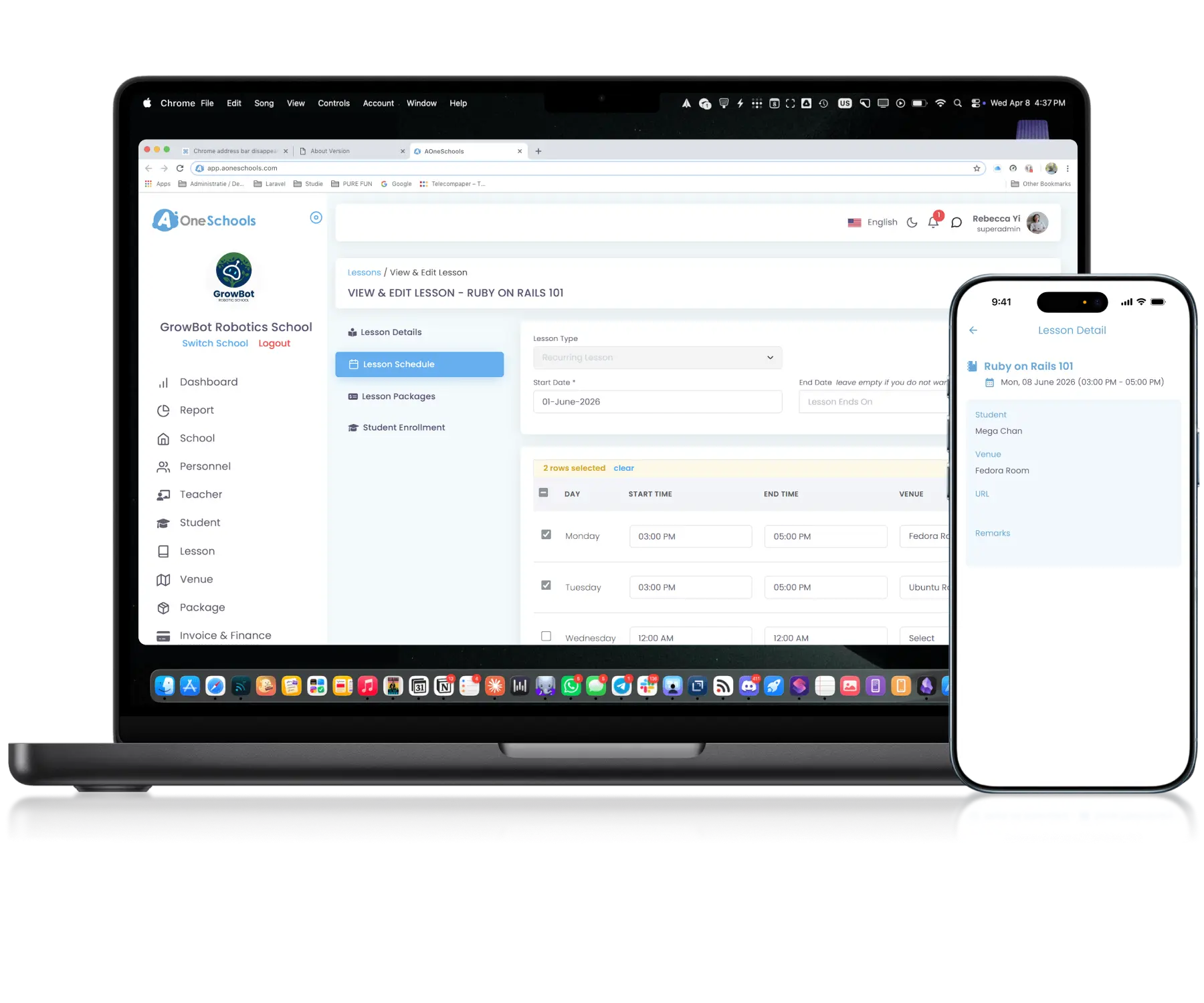
Define and assign venues to lessons, providing clear location information for teachers, parents, and students. The same recurring lesson can also use different venues on different days of the week to support flexible scheduling arrangements.
Assigned lesson venues are displayed directly within users’ calendar views, ensuring teachers, parents, and students can easily see the correct location for each scheduled class. Venue updates are automatically reflected across affected schedules.
Archive venues instead of permanently deleting them, preserving historical venue information for future reference and reporting. Archived venues can be restored again in the future as needed.
Back then, we needed to order receipt books and there was a lot of paperwork daily, taking up a lot of our time.
After using AOne, it reduced our workload and is also environmental friendly because we no longer need to purchase a receipt book. We can issue receipts, and guardian students can check their invoices and receipts through the app.
Scheduling becomes more complex as your centre and facilities grow. See how AOne helps you manage venues alongside timetable efficiently.
Yes, you can. For recurring Lessons conducted on multiple days within a week, you can set a separate venue for each day the lesson is conducted.
However, if there is any one-time venue change you want to make, it is better to do it using the Announcement or In-App Messaging feature to inform relevant recipients rather than changing the venue on the said lesson and reverting back the change(s) later. You can also Pin the announcement to ensure that everyone won’t miss it.
Yes, you can adjust the capacity at any time. The update applies instantly to the venue information viewable by all authorized roles.
Yes, they can. The lesson’s venue will be displayed in the Lesson information when viewing the Schedule or Timetable on their respective accounts.
After you have made and saved any changes in your venue details, the new update will instantly be reflected on relevant users’ calendar. This applies to any viewable information about venue by users, including link to online classes.
Depending on your centre’s decision, there are several things you can do on the system.
Regardless of your decision, we highly advise sending a heads up via Announcement or In-App Messaging to affected recipients, informing them of your decision.
Invoices, tracking, reminders, and receipts: Automated
All student data, organized and manageable in one place
All teacher data, organized and manageable in one place
All your lesson data, organized and manageable in one place
Clear schedules for every lesson for teachers and students
Track revenue, payment status, and performance in one place
Manage teacher and class replacements effortlessly
Simple, digitized registration flow from form to student profile
Real-time attendance with real-time parents notifications